Collect 1 Million Coins Getting Started Guide
Your first vault dig — tools, HUD stats, early upgrades, and what the Giant Coin really means.
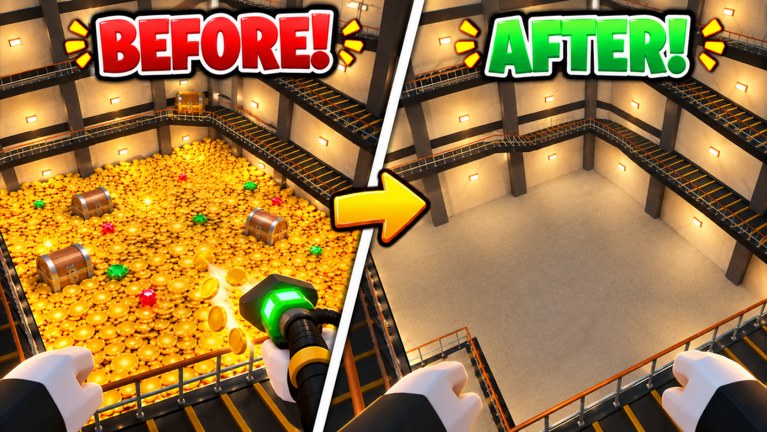
This Getting Started guide is the day-one playbook for Collect 1 MILLION Coins, the Roblox incremental simulator by c1z studio. The place is free-to-play, supports up to 20 players per server, and launched on 2026-10-11. Your goal on the first session is not to break world records—it is to learn the dig loop, read the HUD, buy a sensible first upgrade, and understand the three progress stages: Digging into the vault, Open the Vault, and Giant Coin.
If you only remember one sentence: dig the coin mountain with better tools, fund upgrades from coins (and lucky gems/chests), reach the bottom, open the vault door, and claim the Giant Coin while watching your clear time.
Join the experience
Open the official Roblox place Collect 1 MILLION Coins and join a server. Expect a warm gold vault aesthetic: coin piles, cozy lighting, and a mountain of currency waiting to be excavated. You spawn into a shared dig space—be polite in crowded lobbies, but remember everyone is racing their own timer as much as they are racing each other.
Before you swing anything, glance at the HUD. You should see readouts for:
- Coins collected — your run currency and upgrade fuel.
- Time — the clear-time clock that feeds leaderboards.
- Speed — how quickly you move or process digs relative to the pile.
- Dig Strength — how hard each dig bite removes coin mass.
Treat those four numbers as your dashboard. Early mistakes usually come from staring only at Coins while Speed or Dig Strength stay pitifully low.
Meet the tool UI
The visible tool set includes Hands, Shovel, Vacuum, Drill, and Magnet. You will not unlock every fantasy loadout on minute one, but you should open the tool UI immediately and note what you currently equip. Hands are the baseline; Shovel is the classic early dig feel; Vacuum, Drill, and Magnet each change how you interact with the pile as you invest.
Do not panic-buy every button. Open Tools & Upgrades after this page for role explanations and priority. For the first ten minutes, your job is simpler: dig enough coins to afford a meaningful bump to Dig Strength or Speed, then feel the difference in the pile.
Cross-check community rankings on the Tier List once you understand the names, but do not treat the tier list as a substitute for learning the HUD yourself.
Your first dig session
Minute 0–5: learn the mountain
Start digging straight into the coin mountain. Stay aware of nearby players so you do not block each other awkwardly, but focus on carving a clear vertical sense of progress. Watch Dig Strength: if each swing barely chips the surface, you already know your next purchase target.
Collect coins steadily. Resist the urge to wander the entire vault looking for secrets before you can dig effectively—secrets matter more once your tool can actually clear volume. When you spot sparkle cues or odd pockets, mark them mentally; the Gems & Chests guide explains how to search without wrecking your timer.
Minute 5–15: first upgrades
Spend early coins on the upgrade that removes your biggest bottleneck:
- If digs feel soft → prioritize Dig Strength.
- If you can dig but relocation feels sluggish → prioritize Speed.
- If both feel fine but income is slow → keep digging while you plan the next tool tier.
One strong upgrade that you feel immediately is better than three tiny purchases you forget. After the bump, dig another layer and confirm the HUD numbers moved. This feedback loop—dig, earn, upgrade, re-test—is the heart of Collect 1 MILLION Coins.
Minute 15–30: aim for stage awareness
You may not open the vault on your very first login, and that is fine. Learn to recognize when you are still in Digging into the vault versus when the bottom and door are realistic. Depth matters more than random side caves. When you are ready for a structured full clear, switch to How to Clear the Vault.
What the Giant Coin means
The Giant Coin is the climax reward after you dig deep enough and open the vault. Think of it as the run’s victory lap and the moment your Time score becomes meaningful for comparison. Clearing to the Giant Coin teaches the full loop; repeating that clear faster is how leaderboard play begins. Day-one players should treat the first Giant Coin as a tutorial graduation, not as the end of progression.
If a run stalls before the door, do not rage-quit without learning why. Ask: Was Dig Strength too low? Did I waste minutes on shallow side digs? Did I ignore chests that could have funded a tool jump? Those answers send you back to the right wiki page.
Codes, scripts, and safety on day one
Check Codes for any active promo codes for this game. We only list codes that belong to Collect 1 MILLION Coins—not codes copied from similarly named coin or item collectors. If none are live yet, keep the page bookmarked for future drops.
Visit Scripts only for status and safety context. There may be no verified public scripts for this place ID; never paste unknown executors or share account details. Digging with legitimate upgrades is the intended path.
Social tips in a 20-player vault
Servers cap at about 20 players. You will share the mountain. Good habits:
- Dig your own shaft when possible instead of griefing someone else’s tunnel.
- Call out if the community uses chat for chest finds—optional, but friendly.
- Remember leaderboards reward your clear time; helping a friend learn the loop still helps the lobby vibe.
For etiquette and player-facing tips, skim Players after you finish this guide.
First-session checklist
Use this list before you log off day one:
- Joined the official place and confirmed the gold vault aesthetic loaded.
- Located Coins, Time, Speed, and Dig Strength on the HUD.
- Opened the tool UI and noted Hands / Shovel / Vacuum / Drill / Magnet availability.
- Completed several dig cycles into the coin mountain.
- Bought at least one upgrade that noticeably changed Dig Strength or Speed.
- Spotted (or learned to look for) gem/chest opportunities.
- Understood the three stages: dig → open vault → Giant Coin.
- Bookmarked Guides Hub, Tools & Upgrades, Codes, and Updates.
What to read next
- Tools & Upgrades — role of each tool and upgrade priority.
- How to Clear the Vault — full clear walkthrough.
- Gems & Chests — hidden loot patterns.
- Speedrun Clear Times — once clears are consistent.
- Tier List — community ranking context.
- Updates — what changed since launch and the 2026-11-11 refresh window.
Common day-one mistakes
Ignoring Dig Strength. Pretty tunnels mean nothing if each hit is weak. Fix strength early.
Chasing every shiny distraction. Gems and chests are valuable, but endless lateral searching before you have a workable tool wastes Time.
Saving every coin forever. Upgrades exist to be spent. Bank a buffer if you want, then buy the bottleneck fix.
Confusing this game with other coin collectors. Mechanics, codes, and scripts are specific to Collect 1 MILLION Coins by c1z studio. Stick to this wiki’s pages.
Forcing a speedrun mindset too early. Learn a clean clear first; then optimize with the speedrun guide.
Mindset for an incremental digger
Collect 1 MILLION Coins rewards patience layered with smart purchases. The cozy vault fantasy is intentional—you are meant to enjoy the glow of coins as numbers climb. Still, the simulator side is real: better tools compound, clear times teach efficiency, and leaderboards give long-term goals after the first Giant Coin.
Play one focused session with this checklist, then return for a planned clear using the vault guide. When patches land, re-check Updates and adjust your upgrade order. That habit—learn, dig, upgrade, clear, refine—will carry you from first login to confident vault runs without burning out or wasting currency.
You now know how to join, what the HUD means, how tools appear in the UI, how to spend early coins, and why the Giant Coin caps a successful dig. Grab your starting tool, open a shaft into the mountain, and start collecting toward that first real clear.
Frequently Asked Questions
Quick answers for vault diggers and clear-time chasers.
What should I upgrade first as a beginner?
Fix your biggest bottleneck. Soft digs mean Dig Strength; sluggish repositioning means Speed. One noticeable upgrade beats several tiny buys. See Tools & Upgrades for full priority.
What does the Giant Coin represent?
It is the climax reward after digging to the bottom and opening the vault. Your first Giant Coin proves you understand the full loop; later clears focus on better Time scores.
Where do I see Speed and Dig Strength?
Both appear on the HUD with Coins collected and Time. Watch all four while you dig so upgrades target real weaknesses.
Are there codes I should redeem on day one?
Check the Codes page for active Collect 1 MILLION Coins promos. Do not redeem codes meant for other similarly named games. If none are live, keep checking after updates.
How many players are in a server?
Servers support up to about 20 players. Dig politely, keep your own shaft when possible, and treat clear time as your personal score.